Thursday, August 02, 2007

Day 2: Take Your Own Pictures

This is the second day in my Month of Savings and today I wanted to share with you another excellent way to save your family money.

You might not be getting professional pictures every single month, but I bet you do get them on occasion. I am often surprised by the amounts that people spend on pictures of their children, especially in the day and age of digital photography. I am certainly not knocking the experience of a quality picture and I love to have a couple of these of our children, but I have found that I enjoy the pictures that I take of my children more than the ones that I have had professionally done. You could say that this is partly because I went to a department store versus a private studio, but regardless, it was an expensive process for our family.

The one thing that I found happening, particularly when my children were really little, was that it was hard to find an appointment time that would work with the times that they were the most happy. I would try and schedule it around naps, but it never failed that they would end up napping early/late, that someone got sick, that someone was cranky- you get the picture!

When my daughter was born, I now had two children to work around and I decided that it would be much simpler if I could begin taking my own pictures. I won't say that this wasn't just as time consuming, but the experience was entirely different for me.

I would choose the times that my child was most happy (usually when they first woke up) and I would capture these glorious moments that would have been missed if I would have relied on taking them to a studio.

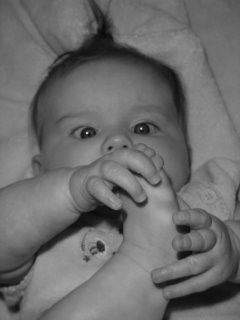
I have a picture of my daughter discovering her toes, a picture of my little boy with his first morning smile, and my daughter with her crazy bed-head curls in her sweet pajamas. I have a picture of my son eating his first leaf and a picture of my daughter splashing her heart out in the bathtub. Those are the moments that I really want to remember, not a perfectly posed child on a pristine white background.

These are some of the useful tools and sites that I have found to help me create great pictures of my kids:

Picasa- This is a great free program from Google that can help you edit your pictures. The software locates all of the pictures on your computer and has simple editing tools that you can use to take out red eye, crop photos, and apply any special effects (black and white, glow, sepia, etc..). This program is amazing and has helped save many of my photos that I thought could never be printed. You can lighten the photos and adjust the colors to make those dark photos viewable. This is a great program for the beginner and I find it much easier than many of the complicated and expensive software programs on the market.

Digital Photography School- I adore this website because you can get schooled on how to take great photos, without paying any tuition! They offer loads of tutorials on how to take great pictures and explain concepts in a way that even a novice could understand. Be sure to visit their how to photograph a child's birthday tutorial and the ten questions to ask when taking a picture. This website is a wealth of information and everything you ever wanted to know about taking good pictures is right there.

Snapfish- Offers 30 free prints and free shipping using the coupon code SNAPYFRSH07. You can not only save money by not going to the pros, you can also save money on the printing process.

Photoworks- Photoworks customers can get 25 free prints on their first order (using the provided link).

Most importantly, don't forget to read your manual. The manual will offer all of the tips and tricks you need for operating your own camera and will help you choose the right settings for any situation.

If you need further help, visit your local library and check out some books on photography. You can read through tutorials or just look through pictures that the professional photographers have taken. Looking through books like these might give you some new ideas for pictures to try with your own child.

Potential Savings= $20 or more

Related Readings:

What to Get the Person Who Has Everything
Philips Digital Picture Frame
Adobe Photoshop & Premiere Elements
10 Easy Steps to Great Kids Party Pictures

Sound Off: Do you do professional photos or are you the professional in your house? What is your favorite picture of your child?

Labels: , ,

8Comments:

Blogger Kara
"We haven't had professional pics done for almost 3 years, when Toddler was a baby. I feel bad because I would like nice pics of them, but then I think "you know, my parents didn't get a ton of professional pics of me when I was little, and I don't care, so my kids won't either." I would like to try to get a yearly family pic, I'm just afraid to go cuz they always talk me into buying more than I intended. I agree it's those snapshots we take that mean more :)"

at 9:31 AM  

Anonymous sarah
"If you want to do a yearly family picture, many digital cameras have self-timers on them. Look in your manual for instructions. You might invest in a tripod, which can be had for less than $30 most of the time... also great for capturing low-light photos when you don't want to use the flash, so your pictures don't turn out blurry from hand movement."

at 11:15 AM  

Blogger SB
"I am a pro photographer myself. And the main thing my customers want is natural poses of their children. Even though I have an education and skill, I don't that much more than any other mom with a camera.

I do keep my prices VERY low. (my clients tell me that my work is better and CHEAPER than Target packages after all the fees and extras.) I charge less because I could not live with myself if I were gouging another mom, just because I could. I have strong standards.

That being said...I always recommend natural light and remember to take pictures of everything, even the bad haircuts, lollipop faces, busted lips, and the first time your lil girl steals your lipstick.

:)

www.suzannebalvanz.blogspot.com"

at 12:03 PM  

Anonymous Kris
"We've only taken one family photo, but I do pay for school pictures every year. As a teacher, I see just how long the photographer takes on those pictures, so you think I wouldn't buy them anymore...

I took lots of pictures of my extended family this summer when I was visiting. I plan on giving photos (looking for cute, cheap frames) for Christmas gifts this year. This is a $5 gift that nobody will even care how little it cost."

at 12:09 PM  

Blogger MommySecrets
"I've often thought about trading family photo time with another family. Ask a friend (who's photography you like) to come take photo shoots of your family, then recipricate the favor for their family.

You can even bring samples of nice photographs that you want to mimic with your family photos. It's much easier to replicate a great photo opp, than try to create the photo opp on your own!"

at 3:38 PM  

Blogger mama k
"Awhile back I posted my tips for taking great (professional looking) newborn pictures:
http://mamaknj.blogspot.com/2007/05/photographing-offspring.html

We have only had one professional photo shoot done and that was for his Christening. We went to Sears and it wasn't too expensive.
Still, I'm planning on doing another home photo shoot for his 1st bday pictures. I use Shutterfly.com. They are not the cheapest, but they let you store as many pictures as you want for as long as you want on their site. They also have great photo gifts.

Another idea I saw (and copied) was taking a picture of baby in the same chair with the same stuffed animal each month for the first year. I get to see how he has grown and changed month to month in comparison to the same setting. This would be a fun tradition to continue at each birthday."

at 4:25 PM  

Blogger Scribbit
"I've found Picasa nice and easy to use too, much easier than say Photoshop.

Our secret to photos? Make friends with a professional photographer who gives you portraits as birthday gifts :)

It's terrific."

at 1:35 AM  

Anonymous Anonymous
"At first I was paying to have professional photos done and then I realized that I could do the exact same thing at home WAY cheaper. So, I looked at other peoples pro photos for ideas for poses at the different ages and then recreated the scenes at home.
Backdrops are quickly created with king size bed sheets (I recommend ironing out the wrinkles) draped over something (such is the side of the crib) and then pulled out underneath the baby on the floor (with age appropriate supports covered underneath).
Following the pro's cue, I use a darker sheet (navy blue) with darker clothing and lighter sheet (cream) with lighter outfits. This also gives you greater versatility in choosing the color. My baby always looks washed out with a white background, but much better with a cream one. If you are willing to spend a bit, go to the local fabric store and buy a large piece of suede or velvet (watch the Sunday paper for coupons to save 40%). This can be used over and over again.
Age appropriate supports-- When the baby is younger you can do this with a nice blanket over a bouncy seat, upgrade to the boppy pillow covered with the back drop as they get better head control, etc.
In the fall, a really nice picture with kids is to rake all the leaves into a pile and put the children in it. The fall colors provide a beautiful natural background.
Everyone comments how great my shots look and are surprised to learn that I did them myself.
Once the photos are set up, just snap away. Try to zoom in enough that the back drop takes up the entire shot, but if the baby moves and the shot is askew, either crop or go in with photo editing software and clone the background to blend the spot.
One other bonus is that you can never seem to get 4x6 photos in the photo sheets from the pros (a major pet peeve of my husband), when you do it yourself, you have complete control of sizes, no one dictating that you need to have a zillion wallet size pictures that you will never use."

at 2:03 PM  

I am a frugal hacker
My site was nominated for Hottest Mommy Blogger!
My site was nominated for Best Blog Design!
My site was nominated for Best Parenting Blog!
My site was nominated for Best Food Blog!